

API - HTTP
The unispa HTTP API provides a convenient way of integrating devices with this software into any existing ecosystems and platforms. It offers a RESTful interface that allows accessing unispa features from a third-party software. In this guide, you will find a detailed technical specification of the various endpoints, commands, and parameters available in the API to help you get started. Whether you are new to unispa or an experienced user, this guide will provide you with the essential information required for successful implementation.
Unlike MQTT or Serial communication , HTTP API is designed to allow the user to have a complete control over all aspects of the device.
In the broadest terms, to access the required resource, the user needs to send an HTTP GET or HTTP POST request to the local* network URL:
http://[IPv4]/[resource]
To find out more about available resources please see the following Telemetry, Parameters and Commands sections.
Telemetry
To obtain the required telemetry data as a response, the user needs to send an HTTP GET request to the following URL:
http://[IPv4]/reading_request?data=[TELEMETRY]
HTTP API access to the telemetry data listed below is available in all unispa versions.
| [TELEMETRY] | Payload | Note |
|---|---|---|
RE1-RE12 | 0 for LOW, or 1 for HIGH | Returns current state of the output |
I1-I8 | numeric reading | Returns current reading as a plain numeric value in the predefined unit (unit symbol not included) |
in_out_all | JSON | Returns basic summary of all physical peripherals D0-D8 and I1-I8 containing current reading or state and unit (if applicable). |
Parameters
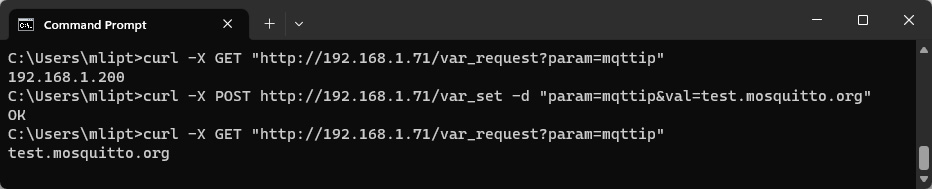
To set or change the selected parameter, the user needs to send an HTTP POST request to the following URL:
http://[IPv4]/var_set?param=[PARAMETER]&val=[VAL]
To obtain the selected parameter's saved value as an HTTP response, the user needs to send an HTTP GET request to the following URL:
http://[IPv4]/var_request?param=[PARAMETER]
System settings
HTTP API access to the system variables listed below is available in all unispa versions.
| [PARAMETER] | Default value | [VALUE] | Description |
|---|---|---|---|
Name (devicename) | my_uni | String of up to 25 characters | Name of the device used for its easier identification in the network. It is also used as an SSID in case of the Wi-Fi AP mode. |
SSID 1 (ssid1) | aya_ssid | SSID names of the primary and secondary 2.4GHz Wi-Fi access points to connect to. Connection to the secondary network is only attempted if the primary network is not accessible and uses parameters automatically assigned by the router. Please note that 5G bandwidth networks not supported. | |
SSID 2 (ssid2) | empty String | ||
Password 1(pass1) | aya_pass | Wi-Fi Password to the SSID 1 network. | |
Password 2(pass2) | empty String | Wi-Fi Password to the SSID 2 network. | |
User (mqttuser) | mqtt_user | SSID name of the selected 2.4GHz Wi-Fi access point to connect to. Please note that 5G bandwidth networks not supported. | |
Password (mqttpass) | mqtt_pass | Client password to the MQTT broker. | |
Topic L1 (topicL1) | my_uni | Defines up to first 3 subtopics of the topic strings used for communication with the device via MQTT protocol. While the 1st level is mandatory, 2nd and 3rd are optional and are used for a unique identification of the user. Should not contain special characters. Learn more... | |
Topic L2 (topicL2) | empty String | ||
Topic L3 (topicL3) | |||
Password (masterpass) | passw123 | Device administrator password for extended access. This password is also used to access the device in Wi-Fi AP mode, but needs to be at least 8 characters long to work properly. Learn more... | |
Origin(CORS) (origin) | null | String of up to 45 characters | Origin of the web interface from which the device will be accessed. Keep null when using an offline local copy of the interface or the app. |
Default Wi-Fi(1.15)(wifimode) | STA | 0 for STA or 1 for AP or 2(1.16) for Off | Determines the default Wi-Fi mode in which the device begins following the boot.
In the STA mode the device will try to maintain a connection to one of the saved wireless networks.
In the AP mode the device will serve as an independent Access Point, allowing other wireless devices to connect to it.
In the Off mode the Wi-Fi is disabled.
The three modes can be arbitrarily switched during runtime. |
IP Mode(wifiauto) | Dynamic | 0 for Static or 1 for Dynamic | Enables or disables dynamic assignment of local network IP address, Gateway, Subnet mask and DNS by the router. Static implies that user-provided values are prioritized. |
IPv4(Wi-Fi)(localip) | 192.168.1.255 | IPv4 address in the standard decimal format x.x.x.x | Device's local network IP address. Only applicable if Static IP Mode is selected and only used if the provided address is available. |
Gateway(gateway) | 192.168.1.1 | Local network gateway. Only applicable if Static IP Mode is selected. | |
Subnet mask(mask) | 255.255.255.0 | Local network subnet mask. Only applicable if Static IP Mode is selected. | |
DNS(dns) | 8.8.8.8 | IP address of the preferred DNS server. Only applicable if Static IP Mode is selected and an internet connection is available. | |
IPv4(MQTT)(mqttip) | 192.168.1.200 | Internal or external IP address of the MQTT broker. | |
Port(mqttport) | 1883 | integer between 0 and 65535 | Listener port of the MQTT broker. Only non-SSL listeners are supported. |
Connection(mqttallow) | Disabled | 0 for Disabled or 1 for Enabled | Allow or disable connection to the MQTT broker for publishing sensor readings, output state changes or remote control. Learn more... |
Subscription(suballow) | Enabled | Allow or disable subscribing to and receiving MQTT messages for remote control via MQTT | |
Webprotection(secure) | Disabled | Allow or disable password protection for web access. Only keep this Disabled if the device is not accessible outside of your secure and trusted network.Learn more... | |
Extended serial(serial) | Enabled | Allow or disable receiving of the Serial port commands. Keep this disabled at all times if physical access to the device is not restricted! Learn more... | |
Display(display) | Show all | 0 for Show all or 1 for Hide system info or 2 for Hide all | If physical access to the device is not adequately restricted, the user can use this setting to hide either System or All information from the Display loop. |
Time-zone (timezone) | 0 (UTC) | selection of integer between -12 and 30 | Time-zone relative to UTC in which the device's real time clock should be referenced. (Changed to a drop-down selection in version 1.06) |
DST(1.06)(dst) | 2 (Auto [EU]) |
0 for Inactive or 1 for Active or 2 for Auto (EU) or 3 for Auto (US) or 4 for Auto (Aus) or 5 for Auto (NZ) |
When Daylight Saving Time is Active or Auto(1.14) with the current date falling within a predefined date range, an extra hour is added to the device's real-time clock. Changes effective immediately. |
Units(unit) | 0 (in/°C) |
0 for cm/°C or 1 for in/°F or 2 for cm/°F or 3 for in/°C |
Chooses between Imperial and SI (International System of Units) measurement units. |
Program variables
HTTP API access to the program variables listed below is available in all unispa versions.
| [PARAMETER] | Default value | Variable | [VALUE] | Note | Relevance |
|---|---|---|---|---|---|
masterstate | Auto | Main state | 0 for OFF, or 1 for On, or 2 for Auto, or 3 for Sleep, or 4 for Test |
Determines the main operating state of the program. note: Changes made to the physical switch override the saved value and vice versa. | All |
timefrom1 | 09:00 | Operation | HH:MM in 24h format (HH:MM:SS also accepted, although seconds are ignored) | Module's operation start time for the respective days of the week. | |
timefrom2 | |||||
timefrom3 | |||||
timefrom4 | |||||
timefrom5 | |||||
timefrom6 | |||||
timefrom7 | |||||
timeto1 | 21:00 | Module's operation end time for the respective days of the week. | |||
timeto2 | |||||
timeto3 | |||||
timeto4 | |||||
timeto5 | |||||
timeto6 | |||||
timeto7 | |||||
endtimefrom | 21:00 | Drain | Start and end time of the automated water drain. | Kneipp | |
endtimeto | 21:30 | ||||
ledmod | Staticcolor | Mode (LED) | Follow here for value reference | Main program Mode of the RGB driver to be played. | All |
ledspd | 80% | Speed (LED) | integer between 0 and 100 |
Determines the maximum Speed of the RGB driver program. | |
ledbrt | 100% | Brightness (LED) | Determines the maximum Brightness of the LED's. | ||
ledhex | #99CC00 | Color (LED) | standard 6-digit (non-abbreviated) RGB hex code #RRGGBB** (web color) |
Determines the base color for the RGB program. Only effective for relevant programs. | Kneipp Pool |
pirmod | NC | PIR circuit | 0 for NC, or 1 for NO |
Circuit of the PIR sensor in the resting state (no movement detected) | Kneipp |
fillmod | Timer | Fill mode | 0 for Timer, or 1 for Thermostat |
Pools' operating Mode: Timer - filling is regulated by the set times. Thermostat - filling is regulated by the preset temperatures. | |
fillup | Enabled | Filling-up | 0 for Disabled, or 1 for Enabled |
If Enabled, the modules operation is initiated by Filling-up the pools with warm and cold water, respectively.
It should be Disabled if the pools are usually filled prior to the program start.
note: Changes made to the physical switch override the saved value and vice versa. | |
airpump | 1 | Air pump | decimal number between 0 and 9999.9 |
Time for which an Air pump is running following a movement detected by the PIR sensor (in minutes with up to 1 decimal place). | |
timhoton | Refilling | Duration of the ON/OFF-phase of the Refill timer cycle for warm / cold pools (in minutes with up to 1 decimal place). Only relevant if the Timer Fill mode is selected. | |||
timcoldon | |||||
timhotoff | Pause (Refilling) | ||||
timcoldoff | |||||
filluphot | 2 | Fill-up (pools) | Fill-up time for the warm/cold pools (in minutes with up to 1 decimal place) at the beginning of the operation if allowed. | ||
fillupcold | |||||
tempcoldmin | 10 | Min. Temp. | integer between 0 and 40 | The lower / upper bound of the warm / cold pools' Temperature range to be maintained. Only relevant if the Thermostat Fill mode is selected. | |
temphotmin | 30 | ||||
tempcoldmax | 12 | Max. Temp. | |||
temphotmax | 32 | ||||
saunaopt | None | Configuration | 0 for None,or 12: Steamcabin, or 13: Biosauna, or 14: Hot sauna, or 15: Herbalinhalation |
Defines the main hardware Configuration of the cabin module. | Cabin |
heatpower | 33% | Power | integer between 0 and 100 |
Power of the steam or heat generator in % when re-heating. Only active when the temperature reading is in the predefined range. | |
dsmpower | DSM Power | As long as the incoming DSM signal is HIGH, the power output cannot exceed this value, overriding the standard operation. | |||
humidlow | 40% | Min./Max. Humidity | The lower / upper bound of the ambient air's Relative Humidity range to be maintained. | ||
humidhigh | 45% | ||||
templow | 45°C | Min./Max. Temperature | integer between 0 and 105 | The lower / upper bound of the ambient air's Temperature range to be maintained. | |
temphigh | 47°C | ||||
aromaopt | A | Aroma | 0 for Auto, or 1 for Aroma A, or 2 for Aroma B, or 3 for Aroma C |
Selects the Aroma for dosing. | |
aromaon | 3 | Aroma on / wait | integer between 0 and 255 | Duration of the ON (dosing) / OFF (waiting) phase of the Aroma dosing timer cycle. (ON phase expressed in seconds, OFF phase is in minutes with up to 1 decimal place). Only active when the temperature reading is in operating range. | |
aromaoff | 10 | decimal number between 0 and 9999.9 | |||
sprinkleon | 3 | Sprinkler on / wait | integer between 0 and 255 | Duration of the ON (sprinkling) / OFF (waiting) phase of the sauna stones Sprinkler timer cycle. (ON phase expressed in seconds, OFF phase is in minutes with up to 1 decimal place) | |
sprinkleoff | 10 | decimal number between 0 and 9999.9 | |||
venton | 1 | Vent on / wait | Duration of the ON (valve closed) / OFF (valve open) phase of the Ventilation timer cycle. (in minutes with up to 1 decimal place). Only active when the temperature reading is in operating range. | ||
ventoff | 10 | ||||
recircon | 3 | Recirculation on / wait | Duration of the ON (recirculating) / OFF (waiting) phase of the Recirculation timer cycle. (in minutes with up to 1 decimal place). Only active when the temperature reading is in operating range. | ||
recircoff | 3 | ||||
heaton | 3 | Heating / Wait time | Duration of the ON (heating) / OFF (waiting) phase of the Heating timer cycle. (in minutes with up to 1 decimal place). Only active when the temperature reading is in operating range. | ||
heatoff | 3 |
# character by replacing it with %23 or exclude it completely!Commands
To execute the required command, the user needs to send an HTTP POST request to the following URL:
http://[IPv4]/execute?command=[COMMAND]
HTTP API commands listed below are available in all unispa versions.
| [COMMAND] | Note |
|---|---|
reboot |
Reboots the device. |
reconnect | Reconnects to the saved wireless network and to the MQTT broker if applicable. |
factory | Resets all device settings to its factory values. |